
People often come across photos of documents containing important text. Sometimes that text requires editing. One way is to type it all manually, which is time-consuming and also prone to human error. A smart way is to convert those photos into an editable format like Word online. This is a much easier way, especially if the photos are in JPG format. You can easily convert JPG to an editable Word document online using a free tool by JPGtoWord.org.
What is JPG to Word?
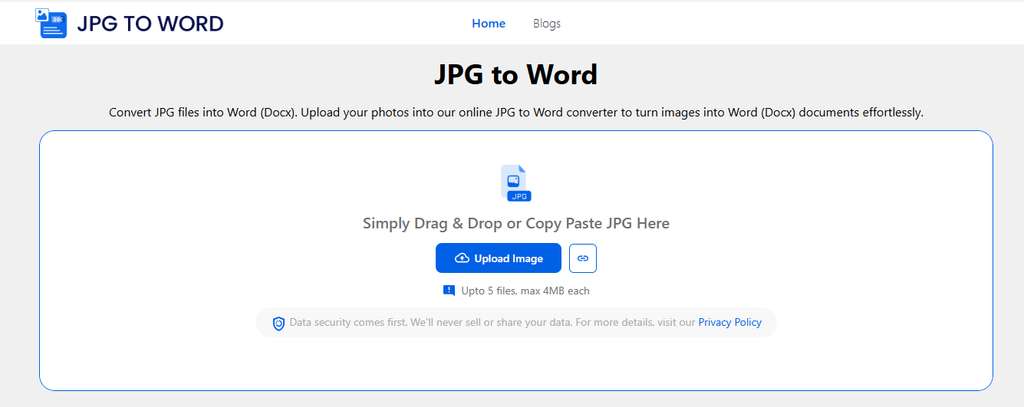
JPG to Word, also called a JPG to Word Converter, is a free utility that uses OCR to convert JPG images into editable Word documents. No matter whether the text inside the image is a digital print or handwritten, the website says that this tool can process both.
The tool first extracts text from the images you provide, then places it into a DOCX file you can download without watermarks.
For example, suppose you have a picture of a one-page report. The image shows the words, but you cannot change them. By running that JPG through the tool, you can instantly get an editable DOCX version.
How to Convert JPG to Word Online?
The process uses a technology called Optical Character Recognition (OCR). It reads the text in an image and turns it into digital text that you can edit, copy, and save.
Follow these steps to convert JPG to Word online for free.
Step 1. Bring Image to JPG to Word Converter
First, bring in your JPG image to the tool. If the image is available on the internet, directly insert the URL by clicking the link icon.

If you have the picture saved on your device, submit it to the tool either by uploading, pasting, or dropping it inside the box.
Step 2. Start the Conversion
After uploading the file, click the Convert button. In case you need to extract text from a particular part of the image, crop that before clicking the Convert button.
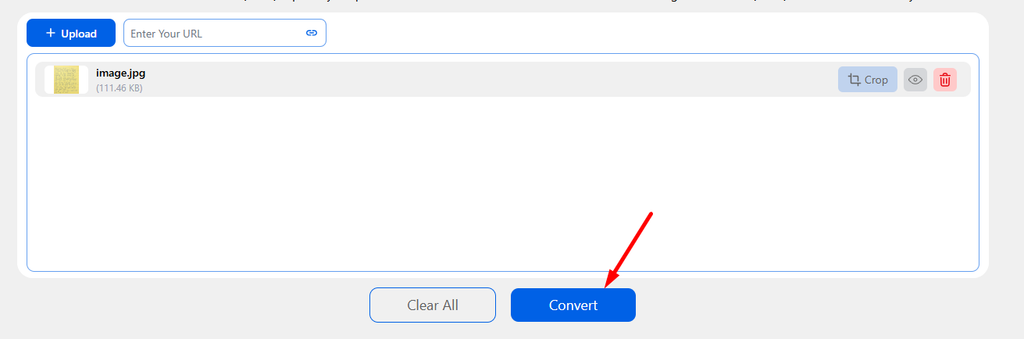
When you click the Convert button, the tool scans the image and identifies the text. The time can vary based on the image size and the service you use. A simple page usually takes only a short time.
Step 3. Download the Word File
Once the process ends, you can download the Word document by clicking the button next to the file inside the results box.
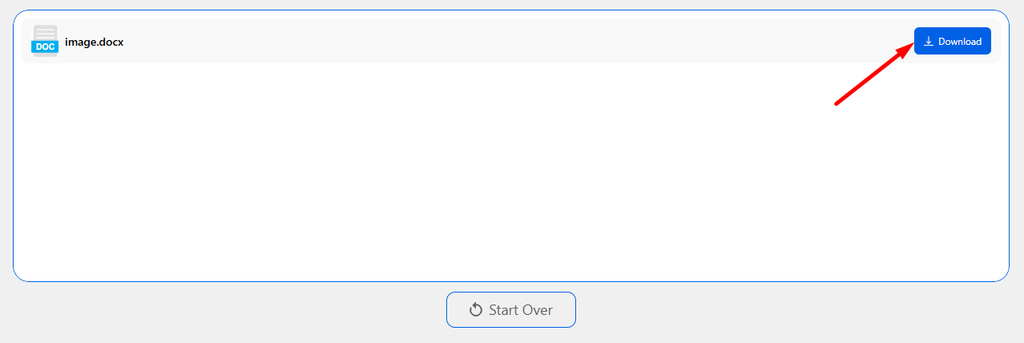
Open the file in Microsoft Word or another compatible word processor. You can then change the text, fix errors, add information, or change the layout.
What Affects Conversion Quality?
Not every JPG gives the same result. The quality of the original image plays a big role.
| Factor | Effect on results |
| High resolution | Makes text easier to read |
| Clear font | Improves text recognition |
| Good lighting | Reduces reading errors |
| Straight page | Helps keep the layout correct |
| Simple background | Makes text easier to detect |
Can You Convert a PNG to Word Online?
Yes, you can convert a PNG to Word online as well. But for that, you will have to use the PNG to Word Converter. One such converter is available on JPGtoWord.org that is fully free to use and supports bulk conversion.
The steps to perform the conversion remain similar to JPG to Word Conversion.
- You add PNG images to the tool.
- You click the ‘Convert’ button.
- Wait for the conversion process to complete.
- Download the Word file and use it as needed.
Can You Convert in Bulk?
Whether you’re converting JPG images or PNG files, bulk conversion support depends on the website you use. If you need to convert JPG and PNG images to an editable Word document in bulk, you can use tools on the website JPGtoWord.org. It supports bulk conversion with a limit of 5 files at a time. This means you can convert 5 different image files into a Word document in one run.
Conclusion
You can convert JPG to Word online using a JPG to Word Converter. Many websites like JPGtoWord.org offer a free converter that you can use. Just open the tool, add your JPG images into it, and perform the conversion. Once the conversion is completed, simply download the Word file, make edits, or use it as you need it.
Frequently Asked Questions
How to convert JPG to Word on mobile?
To convert JPG to Word on mobile, open the website JPGtoWord.org. Next, submit your images and complete the conversion. Once converted, download the Word file from the results page.
Are the converted files editable?
It depends on the conversion method you are using. If you are converting using the said JPG to Word Converter, then yes, you get the editable Word document in the results.
Why Convert JPG to Word?
Converting an image into an editable document can help in many situations.
- Students can turn pictures of notes into editable study material.
- Office workers can convert scanned forms and reports without typing everything again.
- Businesses can extract information from old paper records.
- Researchers can turn pages from scanned documents into searchable text.