
Smart glasses can boost productivity by giving users fast, hands-free access to information, communication tools, and visual guidance without pulling attention away from the task at hand. Instead of constantly checking a phone, laptop, or tablet, workers can keep instructions, notifications, and shared content within view while staying engaged with their environment. This makes smart glasses useful for office work, remote collaboration, training, travel, and everyday planning. They support a more efficient workflow by reducing interruptions and helping users move between digital and physical tasks with less friction. When designed for comfort, clear visuals, and broad device compatibility, smart glasses become practical tools for getting more done with less effort throughout the workday.
Way 1: Smart Glasses Improve Focus With Hands-Free Access
Access Information Without Interrupting Your Main Tasks
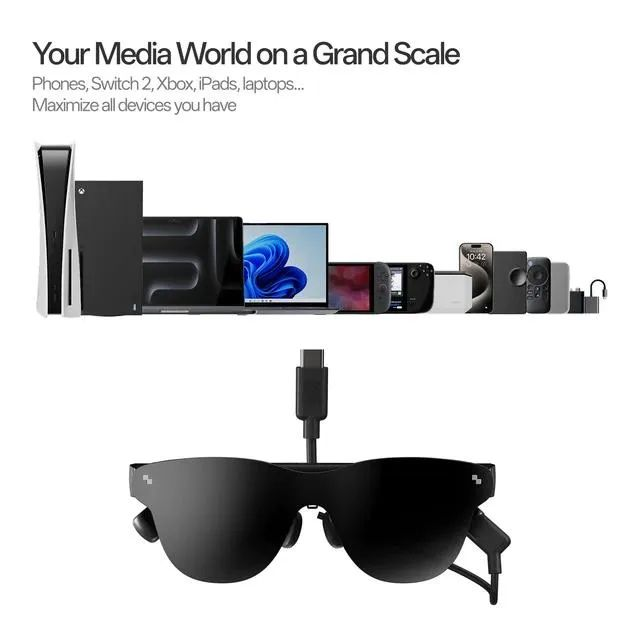
Smart glasses improve focus because they let users view important information while keeping their hands free and their attention on the job. Instead of stopping to unlock a phone or switch to another screen, users can follow prompts, check messages, or review visuals in a more seamless way. This is especially helpful during presentations, technical work, travel, or multitasking across devices. Products such as RayNeo Air 4 Pro AR Glasses support universal connectivity through USB-C and HDMI adapter options, making them compatible with iPhone, Android, PC, Switch, and PS5. That flexibility allows users to connect the same wearable display to different tools during the day, reducing setup time and helping maintain concentration during work, learning, and personal tasks.
Reduce Screen Switching and Improve Work Efficiency
Frequent screen switching breaks concentration and adds small delays that build up over the course of a day. Smart glasses reduce that friction by placing content within immediate view, so users can reference documents, follow workflows, or monitor updates without repeatedly changing devices. This creates a smoother rhythm for focused work and helps people stay engaged longer with fewer mental resets. It can also improve comfort when tasks require movement, since users do not need to hold a separate screen while working. For jobs that involve research, note checking, scheduling, or repeated digital reference points, hands-free access saves time in practical ways. The result is better work efficiency, faster task completion, and a more controlled, less distracting digital environment overall.
Way 2: Smart Glasses Make Communication More Efficient
Real-Time Collaboration Through Connected Smart Features
Smart glasses make communication more efficient by helping users stay connected to messages, shared visuals, and collaborative tools without stepping away from active work. Real-time access to updates can speed up decisions, reduce missed information, and keep projects moving when multiple people need to stay aligned. This is valuable in meetings, remote support, training sessions, and fast-moving work environments where delays can disrupt progress. Connected smart features also make it easier to review content together, respond quickly, and maintain context while discussing tasks. Instead of bouncing between chat windows, calls, and files on separate screens, users can interact with digital information in a more continuous way. That smoother communication flow supports stronger teamwork and fewer interruptions during the day.
Support Remote Work With Better Digital Interaction
Remote work depends on clear digital interaction, and smart glasses can make that interaction feel more direct and less fragmented. Users can stay engaged with virtual meetings, shared documents, and visual content while maintaining awareness of their surroundings and ongoing tasks. This helps reduce the fatigue that often comes from staring at a single laptop screen for hours. Better digital interaction also supports more responsive communication, since updates and reference materials are easier to access in the moment. For distributed teams, that can improve meeting follow-up, shorten response times, and make collaboration feel more natural. Smart glasses are especially useful for professionals who move between home, office, and travel settings, because they help create a more flexible and consistent communication experience across locations.
Way 3: Smart Glasses Enhance Learning and Daily Tasks
Use Visual Guidance for Faster Skill Development
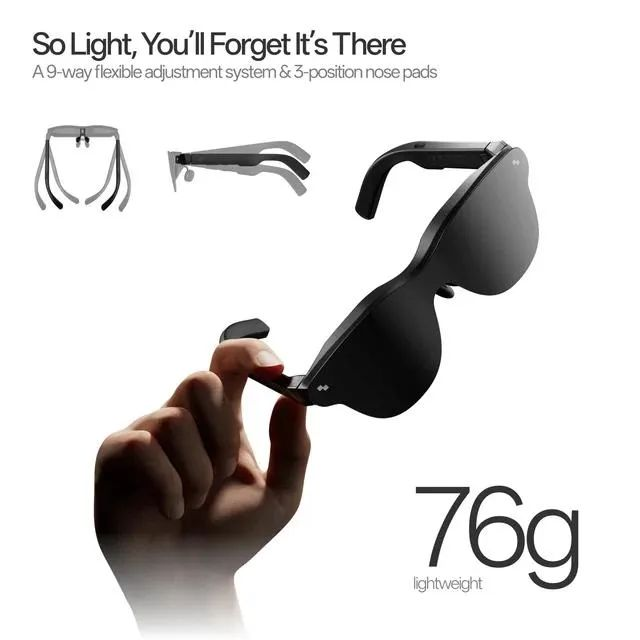
Smart glasses support faster skill development by delivering visual guidance exactly when users need it. Step-by-step instructions, demonstrations, and reference materials become easier to follow when they appear in view during practice instead of on a separate device. This can improve learning for technical tasks, software workflows, creative work, and independent training. Clear display quality also matters, because sharp visuals reduce strain and make details easier to understand. RayNeo Air 4 Pro AR Glasses include the world’s first HDR10 AR display, Vision 4000 processing, and a 201-inch HueView 2.0 screen with more than 1.0 billion colors for rich, high-contrast visuals. With OptiCare eye protection, adjustable ergonomic fit, prescription-ready support, and a lightweight 76g design, they also support longer, more comfortable learning sessions.
Improve Navigation, Planning, and Personal Productivity
Smart glasses can also improve navigation, planning, and personal productivity by making daily information easier to access in real time. Users can review schedules, check directions, follow reminders, or organize next steps without constantly pulling out another device. That convenience helps reduce small interruptions that often slow down routines and weaken focus. For people balancing meetings, errands, travel, and personal goals, quick access to information creates a more structured and efficient day. Smart glasses can also support better time management by keeping priorities visible and reducing the chance of missed tasks. Over time, those small gains can make work and daily planning feel more manageable. The technology becomes especially useful when users want a practical way to stay organized while moving through different environments.
Conclusion
Smart glasses boost productivity in three clear ways: they improve focus through hands-free access, make communication more efficient, and support learning and daily organization. By reducing screen switching and bringing useful information closer to the user, they help create a smoother workflow with fewer interruptions. They also strengthen collaboration by making digital interaction more immediate, which is especially valuable for remote and hybrid work. Beyond communication, smart glasses support skill building, navigation, and planning in practical, time-saving ways. For professionals who want to work more efficiently without adding another handheld device to the mix, smart glasses offer a direct benefit. When comfort, visual quality, and broad compatibility are built in, they become more than a novelty and start functioning as a genuinely useful productivity tool.